ActiveSMS will integrate with your corporate email system to provide 2-way text messaging from your standard email clients (such as Microsoft Outlook). There is no need to install any special software on your desktop computers.
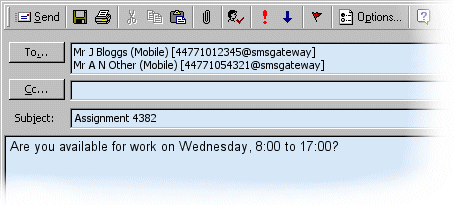
Sending an SMS Message
The example below shows how to send an SMS message by creating an email. You can set-up contacts in your address book so that your can send SMS messages with a few click of the mouse.
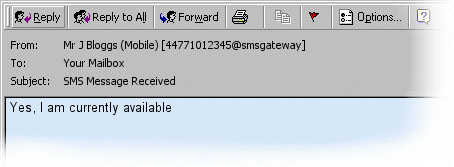
Receiving SMS Messages
SMS replies will be routed back to your Inbox.
SmartRouting
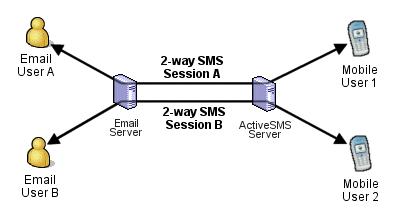
ActiveSMS offers intelligent routing of SMS replies
back to the originating email user. SmartRouting makes it possible for an Email
and Mobile user to maintain a conversation by simply replying to each other's
messages.
ActiveSMS works
by storing routing information for each message sent through the Email to
SMS gateway. This routing information is used to forward SMS replies to the
original Email user.
 |
 |
Email Server Connectivity
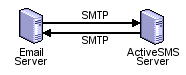
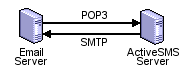
ActiveSMS support two connectivity options:
| SMTP/SMTP Connectivity | SMTP/POP3 Connectivity | |
 |
|
 |
|
Emails are transferred between ActiveSMS and Mail Server using the SMTP Protocol in both directions. |
|
ActiveSMS receives Emails by polling a Mailbox using the POP3 Protocol. ActiveSMS sends emails to the Mail Server using the SMTP Protocol. |
Links
- ActiveSMS
Specification
- SMS to Email Forwarding
- Email to SMS Forwarding